Where to get Accessory parts, Standard parts and FRU parts information for a product?
Where to get Accessory
parts, Standard parts and FRU parts information for a product?
Answer
You
can visit the MiTAC website(
https://www.mitaccomputing.com),
search for the product name (such as B8050, B8056G68, etc.), and click on the
product name to enter its introduction page. Scroll down to find the ‘Accessory’
section, click to enter it, and you can see the accessory/standard/FRU parts
list.
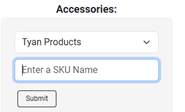
Select
the product series, then select or fill the SKU name, click “submit”.

-->
-->

Related Articles
How to use IPMITOOL to modify BMC FRU file
How to use IPMITOOL to modify BMC FRU Ipmitool: v1.8.18 Command: ipmotool [-H hotst_IP –U username –P password] fru edit <fru id> field <section> <index> <string> Sample: ipmotool [-H hotst_IP –U username –P password] fru edit 0 field p 0 MiTAC <fru ...
How to edit FRU information for the M50CYP MDSG system?
For the M50CYP MDSG system, customers can edit or rewrite the FRU information if it has been wiped out accidentally, using the FRU editing tool included in the FUP or SFUP file downloaded from our website . updM50FruSdr_CYP.nsh If the system shows ...
How to edit BMC FRU
To edit the BMC FRU in the event of corruption, errors or changes you can use ipmitool which is available for all LNX OS and for Windows using ipmitool.exe . In order to edit the FRU you need to know the field type, of which you can follow the chart ...
How can I get the support list for CPU, memory, HDD/SSD, PCIe card, OS, TPM module for a product?
Question How can I get the support list for CPU, memory, HDD/SSD, PCIe card, OS, TPM module for a product? Answer You can visit the MiTAC website(https://www.mitaccomputing.com), search for the product name (such as S8016, B8050, B8056G68, B8261T85, ...
Mitac EGS Platform Get BSOD Issue while installing WS2019 OS