8030 family: BMC couldn't update pass V3.00 due to BMC version is too big for 32MB EPROM chip.
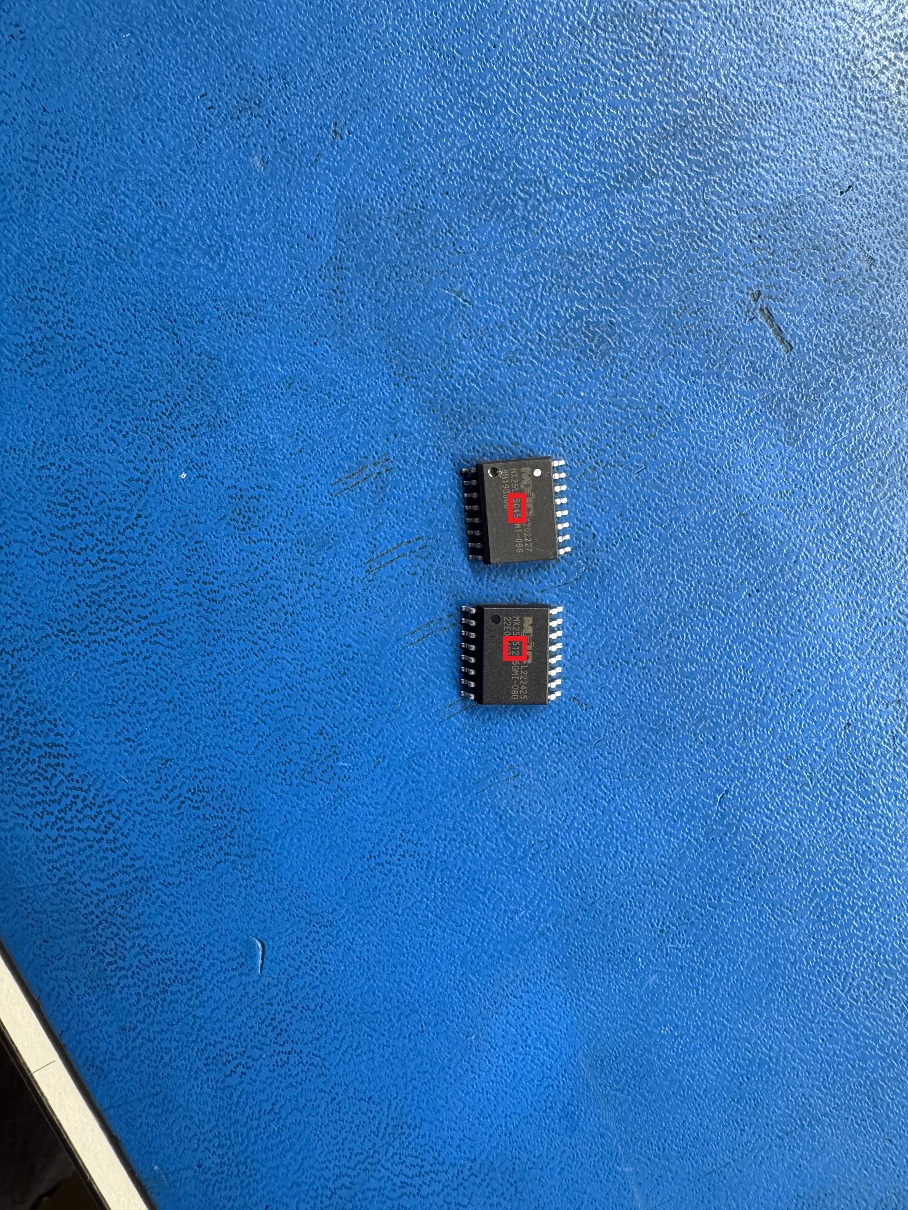
Some of the older motherboards in the S8030 family use a smaller EPROM chip for the BMC. If your motherboard has a 32MB chip, it will only support BMC version up to V3.00. To upgrade to a higher version, you will need to replace the chip with a 64MB version.
You can identify the chip size by the number printed on it: the 64MB chip is marked with "512", while the 32MB chip shows "564".
Please open a support ticket using the link below to request assistance from MiTAC with upgrading the EPROM chip.
Related Articles
How to Upload VROC or BMC Management Key
Upload via BMC Web Console 1. Login to Integrated BMC Web Console. 2. Click “Configuration” in menu bar and click “License Management”. 3. Click “Choose File” and select license key file (*.v2c) then click "Open" then "Upload" 5. BMC Web console will ...
How to use IPMITOOL to modify BMC FRU file
How to use IPMITOOL to modify BMC FRU Ipmitool: v1.8.18 Command: ipmotool [-H hotst_IP –U username –P password] fru edit <fru id> field <section> <index> <string> Sample: ipmotool [-H hotst_IP –U username –P password] fru edit 0 field p 0 MiTAC <fru ...
All stock BMC password related
This article is based off the Forgot BMC Password article published by Ruben Tercero on June 30 2025 in the case of forgetting your bmc passwords you can follow this to reset your bmc password we are using linux ubuntu budgie live for resetting ...
How to choose product “Family Name” while creating ticket?
Provide guideline to choose right family name in quicker way while creating a support ticket. (as enclosed attachment)
HOWTO UPDATE BIOS/BMC LOGO TO R1520G6 AND R2520G6
Step 1: Click this https://preprodservertools.mitaccomputing.com/ to open the Pre-production Servertools web. Then click Firmware Customization Portal. Step 2: Enter your Microsoft credentials as shown below. Step 3: Select R520G6 Family Step 4: ...